
Koala Sampler
elf audioMusic & Audio
4.8523.00 Reviews
- Version
- 2.0.3
- Installs
- 100.00K
- Age Rating
- Everyone
Screenshots
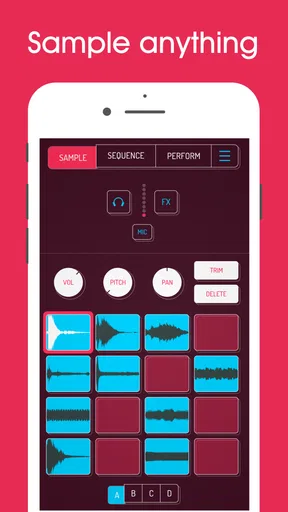
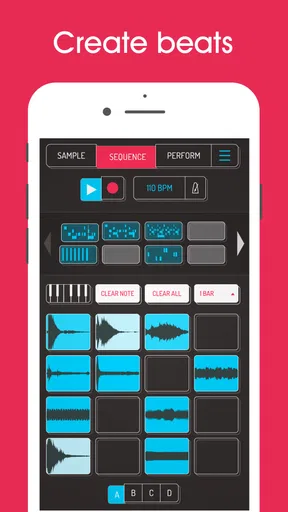
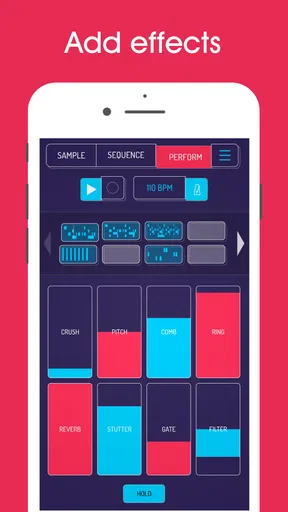
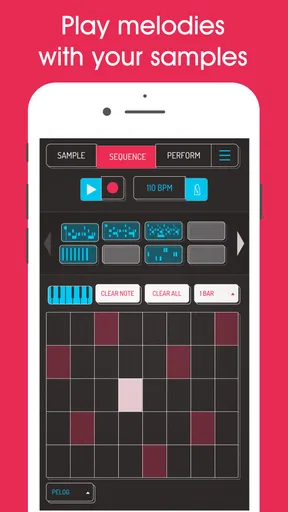
Our Review of Koala Sampler
 Analysis by Appyee
When I want to turn an everyday sound or a half-formed rhythm into a musical idea, I reach for a sampler rather than a full recording studio. Koala Sampler is built for that quick, hands-on kind of work: capture sounds, arrange them into beats, and experiment without first setting up a complicated desktop session. It’s a paid music-making app from elf audio, and its appeal is less about replacing every tool in a producer’s setup than about making sampling feel immediate on a phone.
Where it fits in a music-making setup
On a phone, a sampler has a different job from a multitrack recording app or a digital audio workstation. I use the first to turn short sounds into playable material; I’d choose the latter when I need a broader arrangement and more detailed control over a whole production. Koala is at its best in that first role. It gives me a compact place to collect sounds and shape a beat, rather than asking me to build an entire studio workflow on a small screen.
That distinction matters if you’re deciding whether it belongs on your device. If you like making rhythms from found sounds, sketching ideas away from a computer, or performing short patterns by tapping pads, the focused approach makes sense. If your priority is detailed editing across many tracks, a full-featured production app or desktop setup may suit you better. I’d treat Koala as a creative instrument and idea-catcher, not assume it will replace every production tool I already use.
A useful way to work with found sounds
A practical starting point is to record a few sounds with different roles in mind: a low thump for the pulse, a sharper tap for the backbeat, and a brighter sound for accents. They don’t need to come from instruments. A finger tap, a quick object knock, or a noise from the room can become raw material. The useful trick is to record several contrasting textures rather than collecting many versions of the same hit; that gives a short pattern more character without making it busy.
I also find it helps to make a rough loop before spending time on effects. First, choose sounds that sit apart from each other, then arrange a simple rhythm and listen for what is missing. Only after that would I add processing or resample the combination. This order makes it easier to hear whether an effect is improving the groove or merely disguising a weak source. Resampling is especially handy when a layered idea starts to feel like its own instrument, but I’d keep an earlier version before committing to a new one.
Who will enjoy it, and who may want more
Koala makes the most sense for curious beginners, beat-makers who like working by ear, and experienced musicians who want a quick sketchpad. The simple layout lowers the barrier to trying an idea, while the ability to record and manipulate samples leaves room to develop a personal sound. It can also be a fun way to get a young music-maker experimenting, though the app’s Everyone age rating is not a guide to whether its tools match a particular child’s needs.
It is less convincing as a sole tool for someone who expects a conventional studio workflow, precise long-form editing, or hardware-controller integration. The published review below notes limited advanced editing and no MIDI-controller support; those are meaningful constraints if they are central to how you work. Before paying, I’d ask myself whether I want a fast sampler for making and performing ideas, or a more expansive production environment. That one question is more useful than comparing feature lists in the abstract.
For a realistic everyday use, imagine catching a short rhythm while waiting for a drink: record a few nearby sounds, tap out a rough pattern, and save the sketch so it can be revisited later. That is a better fit than expecting to finish a polished, multi-part song in the queue. The phone-first workflow is valuable because it lets an idea survive the moment it appears, even if the final arrangement happens somewhere else.
Getting Started with Koala Sampler
The first thing you’ll notice about the Koala Sampler is its intuitive interface. You don’t need to be a tech wizard to get started. The app is super user-friendly, with everything laid out in a way that makes sense. You can dive right in without spending hours watching tutorials.
Once you open the app, you’re greeted with a simple screen where you can start recording sounds. Tap to record live audio or import samples from your library. The app supports WAV and MP3 files, so you’ve got plenty of flexibility. And the best part? You can layer up to 64 samples to create a complex soundscape.
Features That Make It Stand Out
What really sets Koala Sampler apart are its features. It’s not just about recording sounds; you can also manipulate them in creative ways. Here are some of the standout features:
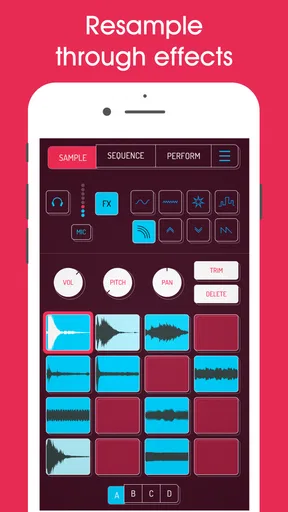
- Effects Galore: Add reverb, delay, or even bit-crush to give your samples a unique flavor. The effects are easy to apply, and you can adjust the intensity with a simple slider.
- Sequencer Magic: The built-in sequencer lets you arrange your samples into a track. It’s as simple as dragging and dropping your samples into the timeline.
- Performance Mode: Ready to show off your skills? Switch to performance mode and trigger samples live. It’s perfect for live gigs or just jamming with friends.
One thing I loved is the ability to resample. You can take a mix of your samples and turn it into a new track, adding layers of creativity to your music.
Making Music on the Move
Koala Sampler shines in its portability. It’s designed for mobile use, and you can literally make music anywhere. Got a melody in your head while waiting for the bus? Just whip out your phone and start sampling. The app’s lightweight nature means it won’t hog your device’s resources, so you won’t experience annoying lag or crashes.
Plus, the app’s design is sleek and minimalistic, which means it’s not cluttered with unnecessary buttons or menus. It’s all about getting you to the music-making process as quickly as possible. And for those who love to share, exporting your tracks is a breeze. Save them to your device or share directly to social media to show off your latest creations.
Room for Improvement?
While the Koala Sampler is fantastic, no app is perfect. If I had to nitpick, I’d say that the app could benefit from more advanced editing tools. While the existing tools are great for beginners, seasoned producers might find them a bit limiting. But for the price and the convenience of having a sampler in your pocket, it’s a minor quibble.
Another potential downside is that the app doesn’t support MIDI controllers. For those who like to incorporate hardware into their workflow, this might be a dealbreaker. However, for pure mobile production, it’s hard to beat.
How the price and version shape the decision
Koala costs $4.99, with in-app purchases ranging from $2.99 to $4.99 per item. I’d think of the purchase as paying for a focused tool, then decide whether any optional additions are worth it for my own workflow rather than assuming I need to buy more to get started. If I only want to try a sampler casually, I’d compare that upfront cost with the free or lower-cost options I already have; if I know I’ll regularly turn recordings into beats, a dedicated app can be easier to justify.
The app’s current version is 1.4154, and it was released on Mar 26, 2020. Those facts give a reader a useful snapshot, but a version number by itself doesn’t tell me how every past update changed the experience. I wouldn’t infer a particular new feature or a promise about future development from it. Existing users should judge the app they have by whether its present workflow still meets their needs, while anyone considering it should check that their device runs iOS 8.1 or later.
Small workflow choices that pay off
For a cleaner first session, I’d decide what each recorded sound is meant to do before loading up a whole collection. A sample that has a clear role is easier to place and easier to judge once the sequence starts. If a loop feels crowded, muting or replacing one sound is often more revealing than adding another effect. This is a simple habit, but it helps keep mobile beat-making focused instead of turning into an endless search for more material.
There is also a practical trade-off between spontaneity and polish. Recording whatever is nearby is a quick way to capture an idea, but background noise and inconsistent recording levels can make a set of samples harder to balance. When I care about a sketch becoming reusable, I’d record in a quieter moment and leave a little room between takes. For playful experiments, I’d accept the roughness; it can be part of the sound rather than a problem to solve.
Performance mode changes the way I’d approach a session: instead of treating the app only as a place to arrange a finished loop, I can think in terms of playable parts and timing. That’s appealing for a casual jam, but it also means practicing transitions matters more than simply having good samples. I’d prepare a small group of sounds that work together and rehearse how I want to trigger them before relying on the phone in front of other people.
What to expect from the current app
The app has an average rating of 4.8 from around three thousand ratings, and it has been installed over a hundred thousand times. I take that as a sign that many people have found a use for this specific mobile sampler, not proof that it will suit every kind of producer. Its Everyone rating makes the age classification broad, while the actual experience still depends on whether the user enjoys making music by recording, arranging, and triggering samples.
For me, the remaining gaps are mostly about workflow expectations. A phone screen is convenient, but it is not the same as a large editing surface; tapping through a pattern can feel less precise than working with dedicated hardware or a desktop timeline. The lack of MIDI-controller support also narrows the options for performers who want physical pads or keys at the center of their setup. If those details are non-negotiable, I’d choose another tool rather than hoping a compact sampler will behave like a full studio.
I’d also keep expectations modest about what “portable” means in practice. A phone makes it easy to capture a quick idea, but long sessions are more comfortable when I can focus on listening and editing rather than juggling other phone tasks. A pair of headphones can help me assess a rhythm in a noisy place, and a quiet follow-up session is a better time to decide whether the sketch deserves more work. That division—capture now, refine later—is one of the most useful ways to make the app fit everyday life.
Final Thoughts
All in all, the Koala Sampler is a gem for music enthusiasts. It combines simplicity with powerful features to help you create music wherever inspiration strikes. Whether you’re on the subway, chilling at home, or waiting for your coffee to brew, this app turns mundane moments into musical opportunities.
So, if you’re looking for an app that can handle all your sampling needs without the fuss, give Koala Sampler a shot. It’s available for both Android and iOS, and trust me, it’s worth every penny. Happy sampling!
Before buying, I’d make one last distinction: this is most rewarding when I enjoy experimenting with short sounds, patterns, and resampling, not when I need every stage of production in one place. The developer, elf audio, has kept the product centered on that pocket-sampler idea; the best reason to choose it is that this compact workflow matches how I actually make music. If I need deeper editing or controller-based performance, I’d look elsewhere. If I want to catch a sound, turn it into a beat, and keep the process approachable, this remains an easy app for me to recommend.
Verdict
Strengths of Koala Sampler
- User-friendly interface for quick sampling.
- High-quality audio capture and playback.
- Supports multiple file formats for flexibility.
- Seamless integration with other music tools.
- Regular updates and feature enhancements.
Limitations of Koala Sampler
- Limited stock sound library available.
- No direct social media sharing option.
- Requires in-app purchases for full features.
- Some features need a steep learning curve.
- Occasional bugs in the loop function.
Similar Picks in This Category
View All
YouTube Music
Google LLC4.4

Samsung Music
Samsung Electronics Co., Ltd.3.8

Spotify: Music and Podcasts
Spotify AB4.3

JioSaavn - Music & Podcasts
Saavn Media Limited4.3

Lark Player:Music Player & MP3
Lark Player Studio - Music, MP3 & Video Player4.6

StarMaker: Sing Karaoke Songs
SKYWORK AI PTE. LTD.4.3
Frequently Asked Questions
What is Koala Sampler and how does it work?
Koala Sampler is a versatile mobile app designed for musicians and producers to create beats and music on the go. It allows users to record, edit, and manipulate samples directly on their device. With an intuitive interface, users can easily drag and drop sounds, apply effects, and sequence their music to create professional-quality tracks.
Is the Koala Sampler app suitable for beginners?
Absolutely. Koala Sampler is designed with a user-friendly interface, making it accessible for beginners while still offering advanced features for seasoned producers. The app provides tutorials and a supportive community, helping new users quickly grasp the basics of sampling, looping, and mixing sounds without feeling overwhelmed.
What features does Koala Sampler offer for music production?
Koala Sampler includes a range of features such as sample recording, waveform editing, pitch shifting, and time stretching. It supports MIDI controllers, offers a variety of effects like reverb and delay, and allows easy export of your creations in multiple formats. The app is powerful enough for complete song production right from your phone.
Can I use Koala Sampler with other music software?
Yes, Koala Sampler is compatible with various Digital Audio Workstations (DAWs). It supports AudioCopy, AudioBus, and Ableton Link, enabling seamless integration with other music production tools. This compatibility allows users to easily incorporate their Koala Sampler creations into broader projects on different platforms.
What are the system requirements for running Koala Sampler?
Koala Sampler is available for both Android and iOS devices. It requires Android 5.0 or later and iOS 11.0 or later. The app is optimized for both smartphones and tablets, ensuring smooth performance. Users should ensure they have enough storage space for samples and projects to maximize their creative experience.
